Hi, I’m Ibrahim. A product designer at Apple, on Apple Pay.
I make complicated systems feel simple: the parts nobody notices until they break. Most of my work is the quiet side of payments, the tools that keep checkout working.
Austin, Texas
Say hello.
Happy to talk about payments, internal tools and design systems.
Make sure every deadline has a person watching it, and make the risky step impossible to do too early.
06Five fixes
1/5 · Nobody sees the deadline
One list of everything about to expire.
Before
Support sees 412 merchants, every one marked Active. Nothing says a key runs out in 4 days, so the first sign is a broken checkout.
After
Every key and website check ending in the next 30 days, soonest first. Red is under a week, amber under two, and the last column says whether a real person knows.
MerchantsSearch
Merchants
412 merchants using Apple Pay on the web
Merchant
Product
Status
Harbor Outfittersmerchant.com.harbor
Apple Pay on the web
Active
Lumen Booksmerchant.com.lumenbooks
Apple Pay on the web
Active
Northfield Grocersmerchant.com.northfield
Apple Pay on the web
Active
Kite Mobilitymerchant.app.kite
Apple Pay on the web
Active
Fable & Comerchant.com.fable
Apple Pay on the web
Active
407 more
ExpiringSearch merchants⌘K
Expiring
Every certificate and domain that ends in the next 30 days, soonest first.
Merchant
What expires1
In2
Owner3
This week2
Harbor Outfittersmerchant.com.harbor
Merchant Identity
4 days
Not reached
Lumen Booksmerchant.com.lumenbooks
Domain SSL
6 days
Notice opened
Later this month3
Northfield Grocersmerchant.com.northfield
Payment Processing
11 days
Acknowledged
Kite Mobilitymerchant.app.kite
Merchant Identity
14 days
Not reached
Fable & Comerchant.com.fable
Domain SSL
23 days
Acknowledged
32 more this month
2/5 · Warnings reach nobody
Everyone who can fix it, contacted step by step.
Before
Apple’s reminders go to one account email. They show as Delivered, but nobody has opened that inbox in 14 months.
After
Everyone who can renew is listed, with who has seen the notice. If nobody answers, more people are told at 7 days, and Developer Support calls at 2.
Merchants › Harbor OutfittersSearch
Harbor Outfitters
merchant.com.harbor
Contact
OAops@harbor.exampleAccount email
Emails sent
Certificate expires in 30 daysTo ops@harbor.exampleDelivered
Certificate expires in 15 daysTo ops@harbor.exampleDelivered
Certificate expires in 7 daysTo ops@harbor.exampleDelivered
Merchants › Harbor OutfittersSearch merchants⌘K
Harbor Outfitters
Merchant Identity certificate expires in 4 days
1No one has seen the renewal noticeIt went to ops@harbor.example, last opened 14 months ago.
2Who can renewNotify all
OAops@harbor.exampleAccount email · bouncedUnread
MKMaya KimDeveloper account adminNot told
RTRavi ThomasPayment providerNot told
3Escalation
30 daysEmail to accountDelivered, not opened
15 daysEmail to accountDelivered, not opened
7 daysAll admins and providerDue today
2 daysDeveloper Support calls Maya KimIf nobody answers by Friday
3/5 · Old key turned off too early
The “turn off” button waits until it’s safe.
Before
Both keys have a Revoke button that works straight away. A shop renewing in a rush can turn off the key that is still taking payments.
After
Support sees which key is serving payments. In the shop’s own account, Revoke stays locked until one real payment has used the new key.
Merchants › Kite MobilitySearch
Certificates
Kite Mobility · merchant.app.kite
Certificate
Expires
Merchant IdentityCreated Sep 2024
10 Nov 2026
Revoke
Merchant IdentityCreated 3 Nov 2026
9 Dec 2028
Revoke
Rotations › Kite MobilitySearch merchants⌘K
Certificate rotation
Kite Mobility · merchant.app.kite
2The merchant can’t revoke yetNo payment has used the new certificate.
1CurrentServing payments
Expires
10 Nov 2026
Last payment
2 minutes ago
NewUploaded, unused
Expires
9 Dec 2028
Last payment
None yet
Create the new certificate3 Nov, by Maya Kim
Install it on the payment serverSeen in a merchant validation request
First successful payment with itWaiting · usually within an hour of traffic
3Merchant revokes the old certificateUnlocks in their account after step 3
Key discoveryThe only proof a new key works is one real payment made with it.
4/5 · Website check fails silently
Run the same check Apple runs, and point at what failed.
Before
The check says Verification failed, and nothing else. The shop retries blindly while the deadline gets closer.
After
Each step Apple checks is run and shown. The one that failed is named, a redirect, with when Apple checks next and a fix ready to send.
Merchants › Lumen BooksSearch
shop.lumenbooks.com
Lumen Books
Domain verification failedLast attempt 6 days ago.
Verify domain
Make sure the domain association file is available.
Verify again
Domains › shop.lumenbooks.comSearch merchants⌘K
shop.lumenbooks.com
Lumen Books · domain verification expires with its SSL certificate in 6 days
What Apple will checkRun again
Verification file is published/.well-known/apple-developer-merchantid-domain-association200
1Served without a redirectRedirects to www.shop.lumenbooks.com, so Apple’s check fails without saying why301
SSL certificate renewedNew certificate valid until 4 Dec 2027OK
2Apple’s next checkApple checks 30, 15 and 7 days before expiryin 1 day
3Fix to send the merchant
Serve the file from shop.lumenbooks.com itself, with no redirect, then run the check again.
Send fix
5/5 · Support starts from zero
Every complaint comes with the full story.
Before
The complaint just says it stopped working. Support replies asking for the merchant ID and domain, and a day is lost.
After
The complaint arrives with what happened, in order: the key expired at 08:00. The suggested reply already names the cause and the fix.
Tickets › #48213Search
#48213 · Apple Pay button stopped workingNew
AT
Atlas TicketsSince this morning the Apple Pay sheet opens and closes right away. Nothing changed on our side.09:41 · via Developer Support form
Reply
Thanks for reaching out. Could you share your merchant ID, the domain, and any errors you see in the console?
Send reply
Tickets › #48213Search merchants⌘K
#48213 · Apple Pay button stopped workingNew
1AT
Atlas TicketsSince this morning the Apple Pay sheet opens and closes right away. Nothing changed on our side.09:41 · via Developer Support form
3Suggested reply
Your Payment Processing certificate expired at 08:00 UTC. Create a new one, install it, and payments resume. Steps attached.
Send reply
2What happened
09:12Every Apple Pay session failingsince 08:03
08:00Payment Processing certificate expired
3 days ago7-day notice to account holderNot opened
Mar 2024Certificate created
07Testing it
Six support specialists tried it before launch.
Who
6 people: 4 Developer Support specialists, a senior support advisor and a technical escalation lead.
How
Remote, moderated sessions of about 45 minutes, on an interactive Sketch prototype. Two rounds of three.
Compared
The same five tasks in today’s tools, then in Merchant Health, noted against each task.
90%of 30 task attempts completed
81%faster to find shops at risk
50% → 83%right diagnosis at the first try
84SUS score
6 of 6preferred it to today’s tools
Time per task
TaskCompletedTime: today’s tools vs Merchant Health
Find shops at risk6/63m 40s42s
Find who can renew5/64m 10s1m 12s
Swap a key safely5/65m 30s1m 48s
Explain a failed check6/64m 20s54s
Answer a complaint5/66m 10s1m 34s
What they said Paraphrased
“I can see what’s about to expire without checking multiple places. It makes prioritising much easier.”
Support specialist
“Knowing the new certificate is working before I revoke the old one gives me much more confidence.”
Senior support advisor
“Instead of just seeing a failure, I can understand what went wrong.”
Technical escalation lead
“Having the shop’s history and certificate status together would save a lot of back and forth.”
Support specialist
From feedback to change
1 of 6Task 1 · Find shops at risk
Read an expiring key as one that had already expired.
Expiring and expired used colours that were too close.
✓
Sharper severity colours and expiry labels, so urgent rows stand out.
A team plays with thirteen, or the match is called off.
03The idea
It started with a simple problem. One Thursday evening we were trying to set up a match, and again we were one short. Everyone was messaging everyone; some pulled out at the last minute, some never saw the messages. I thought: why does something this simple need so much talking?
People weren’t tired of football. They were tired of the coordination around it. Players just wanted to find a match and join. Organisers were stuck writing to people, confirming who was in and filling last-minute gaps. Maça Katıl brings both sides into one experience.
Finding, joining and organising a match should take as few steps as possible.
04Thinking it through
Before drawing, four rules.
A match is decided in seconds, on a phone, often while walking. So every screen follows the same few rules.
1A match is a poster
The pitch seen from above, with when as the biggest thing on it, so a match reads at a glance.
2The day comes before the time
People decide by the day first. “Tomorrow” or “Saturday” leads; the time sits below it.
3Colour comes from the hour
Evening matches are lit gold, night matches deep green. No other decorative colour.
4Lime means “do this”
Only the create button, the joined state and live moments are lime, so the eye goes straight to them.
The hard call: show ratings and levels, or keep it plain?
Player ratings, levels and badges
More to compare
People avoid matches with lower-rated players
More to read before deciding
Only what decides: day, place, spots, priceChosen
A match can be judged in a second
Nobody is ranked
Less to show off
05What people told us
Two weeks with our own group.
Who
Players from our own weekly five-a-side group, the people we actually play with.
How
A closed test around real weekly matches: creating and joining, inviting players, team chat.
Where
In the same WhatsApp group. Feedback came in as messages, the way everything else does.
What they told us, and what changed Representative of the closed test
“There’s too much on the home page. I just want to see matches I can play today or tomorrow.”
→
✓A simpler home page: popular matches easier to see, upcoming match cards reorganised, repeated filters removed.
“I joined a match, but I can’t tell from the card. I have to open it again.”
→
✓Joined matches get their own green state, so you can tell them apart right in the list.
“Finding matches on the map is nice, but switching between list and map should be easier.”
→
✓The map moved to a central, easy-to-reach spot on the main screen, and the day filters now match in list and map.
“There’s too much on the match screen. I want the time, how many are missing and the price.”
→
✓The date and time are bigger, the repeated location is gone, and the empty spots are easier to see.
What I learnedPeople didn’t want a new social platform. They wanted to organise something they already loved, with less effort.
06Rough design
Rough first, then built.
The four jobs were sketched as boxes before any colour: find, join, host and plan. Only the layout and the order of information were decided here.
FindMatches grouped by day.
JoinSquad, price, one button.
HostPitch, hour, fee. Done.
PlanOne pitch everyone can draw on.
The match screen, earlier and now
Earlier→
Now
In the earlier version the time was the headline and the organiser had a star rating. Now the day leads, and nobody is rated.
07The screens
1/4 · Open matches can’t be found
Every open match in your city, day by day.
Before
Open matches only exist inside group chats. If you aren’t in the right group, you never hear about them.
After
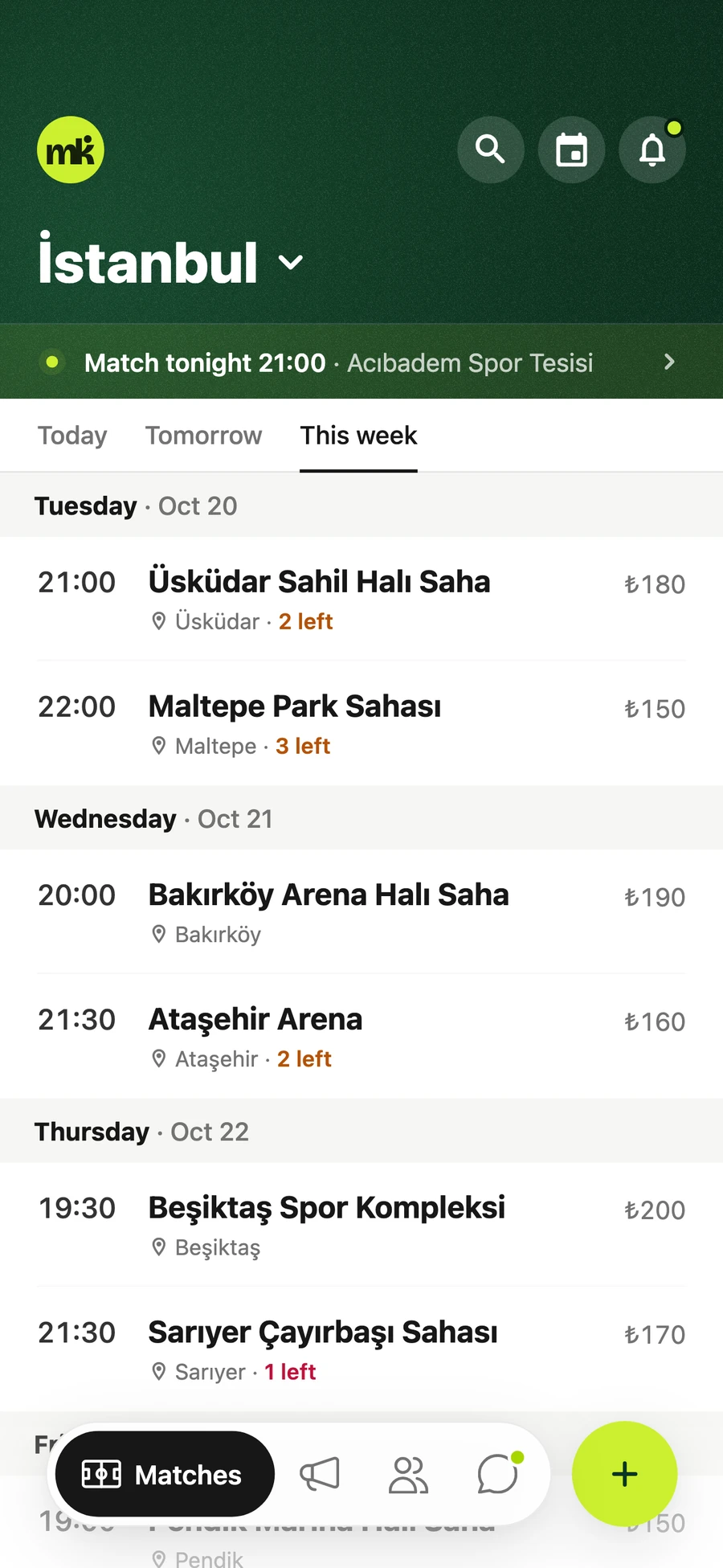
Matches lists every open game in your city under Today, Tomorrow and This Week, with the pitch, time, spots left and price per player.
1The day leads: Today, Tomorrow and This Week, then the time.
2Spots left in amber, so the urgent ones stand out.
3Price per player, not the total pitch fee.
2/4 · Filling a spot means chasing people
Join the squad in one tap.
Before
A missing player means messages, forwards and waiting for someone to say yes.
After
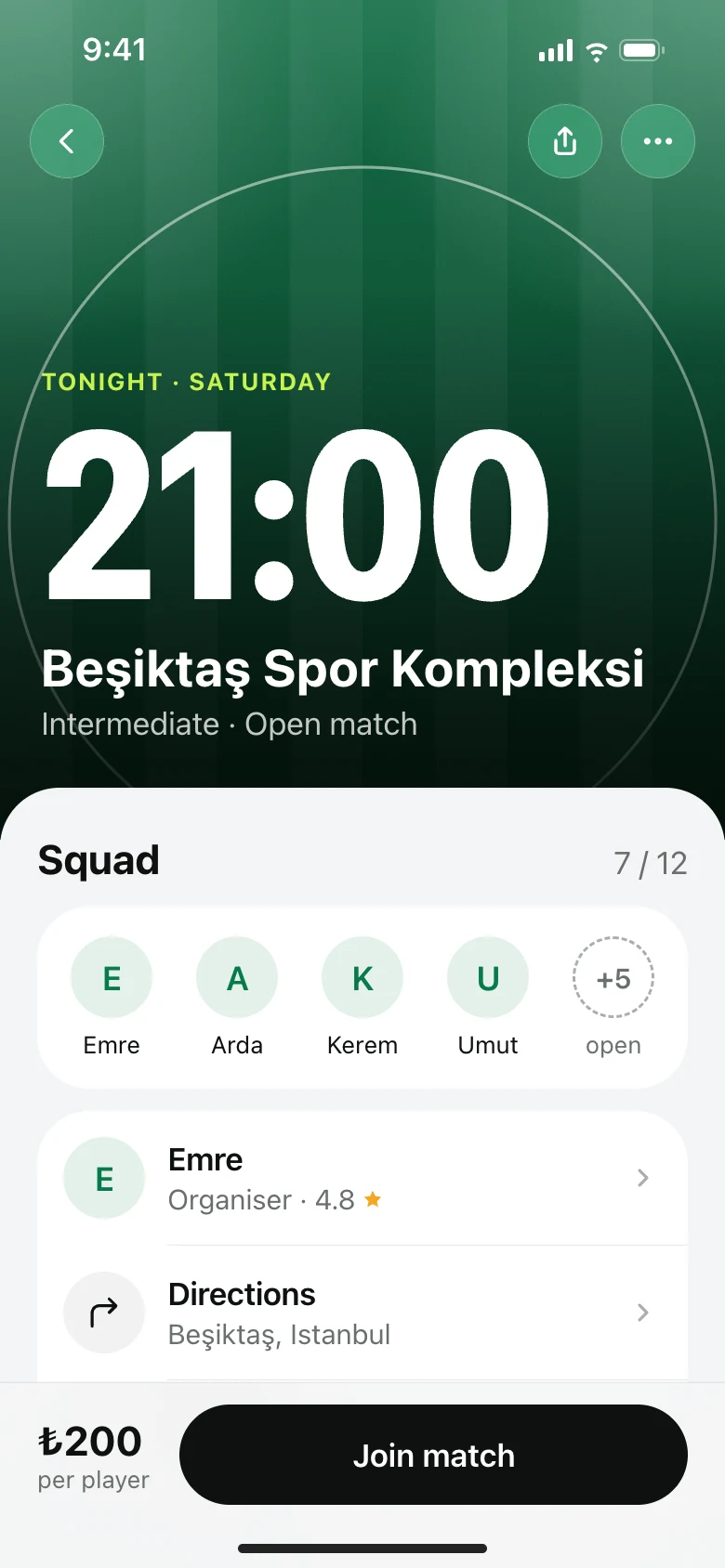
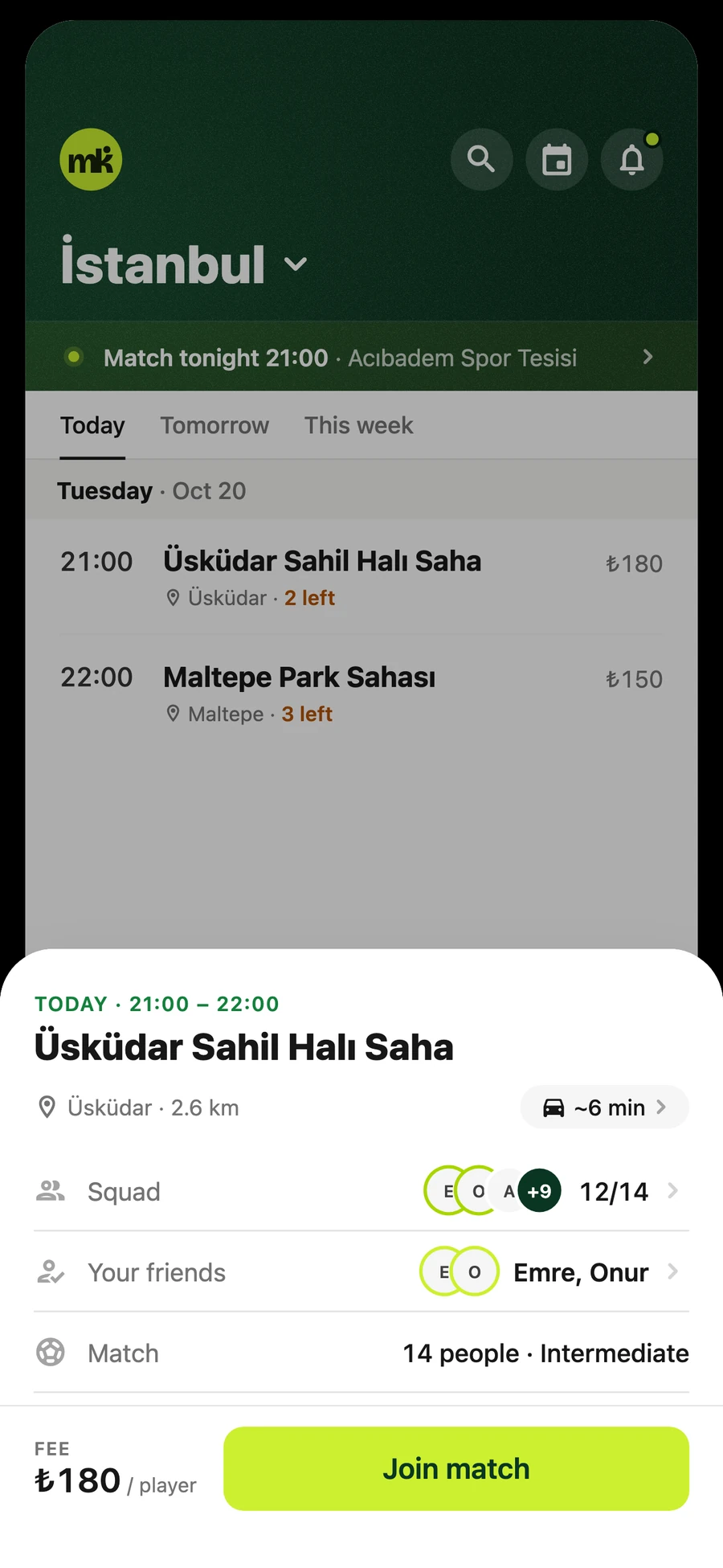
A match opens as a sheet with the squad, friends who are going and the price. One button puts you in the squad.
1Squad count and the friends already in.
2Distance and travel time to the pitch.
3One button, in lime: the only bright colour on the screen.
3/4 · Splitting the fee by hand
Host a match, and the fee splits itself.
Before
The organiser divides the pitch fee and collects it person by person.
After
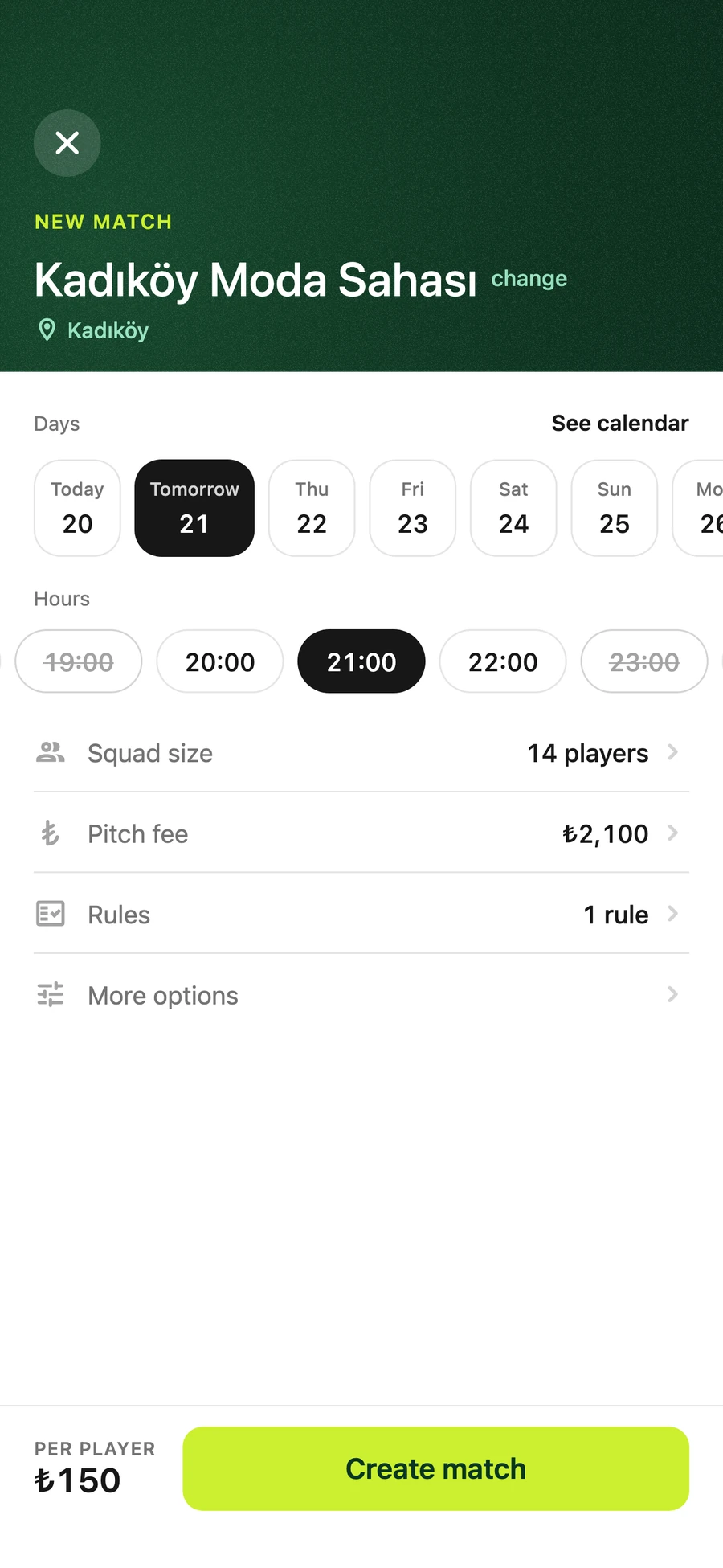
Pick a registered pitch, a day and a free hour. Enter the pitch fee once; the price per player is worked out from the squad size.
1Hours already booked at the pitch are struck through.
2Squad size and pitch fee, nothing else to fill in first.
3Price per player shown before you create the match.
4/4 · Organising sits on one person
A team that can plan together.
Before
The squad, the line-up and the tactics live in one person’s head and a group chat.
After
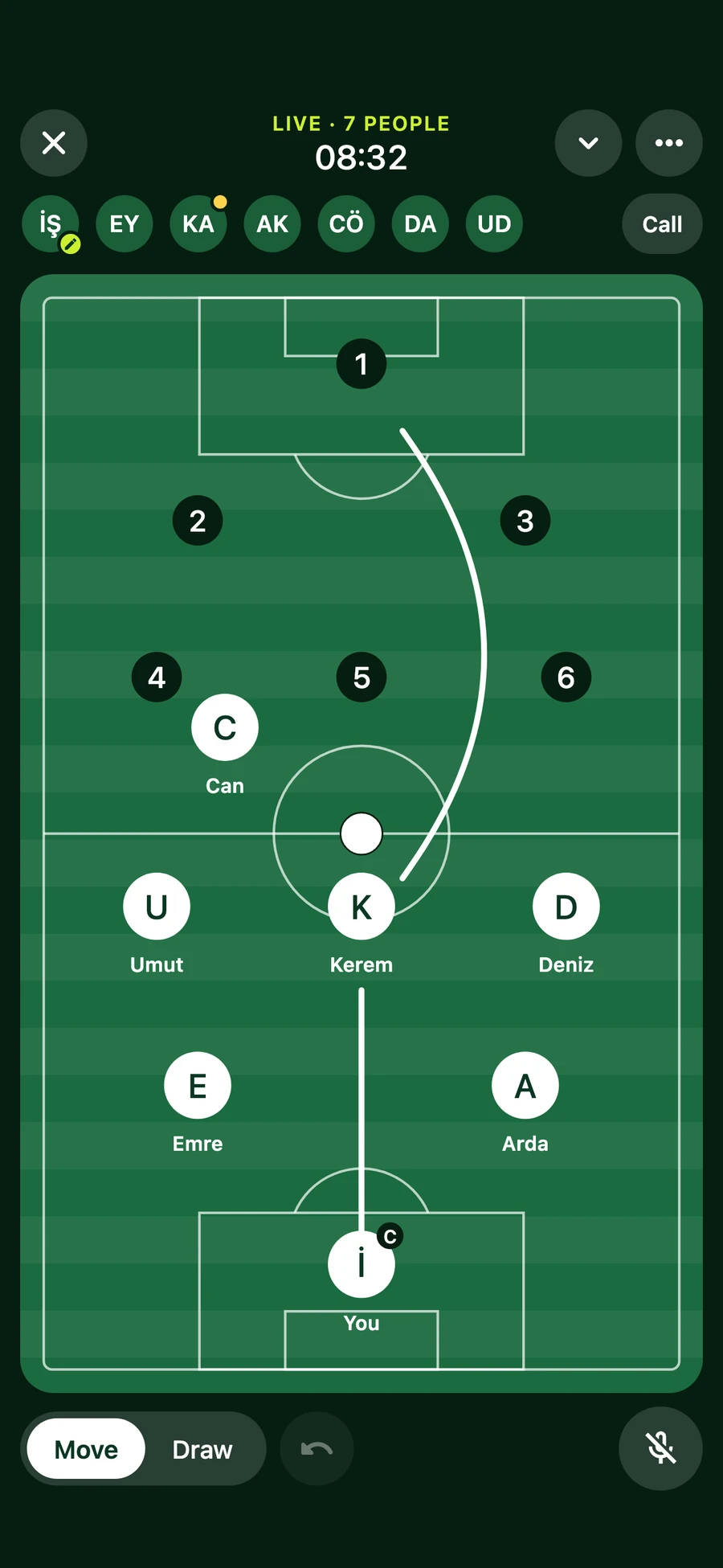
Teams get a squad list, a calendar and a rival finder. On the live Match Board the captain moves players and draws the plan while everyone talks.
1Everyone in the session, live at the top.
2Move players and draw the plan on one shared pitch.
3A voice room built in, so nobody leaves for another app.
08The same Thursday
The same Thursday, with Maça Katıl.
WithoutWith Maça Katıl
MondayOne person books and chasesThe match is listed for everyone nearby
Thursday“One short” in every groupA nearby player joins in one tap
Match dayThe fee split by handPrice per player set from the start
21:00Kick-off with thirteenKick-off with fourteen
Thursday, 21:00. Everyone is there.
09Where it stands
LiveOn the App Store since 26 October 2026, free.
3,700+Pitches across Türkiye, city by city.
2 languagesTurkish and English.
10Looking back
1
Colour should mean something
The interface is neutral. Lime only ever means “do this” or “live”, so the eye goes straight to it.
2
Only what helps someone decide
No ratings, levels or counts for their own sake. Every line on a match is there because people choose by it.
3
Real data, or an honest empty state
No sample matches or made-up numbers in the app. A quiet city shows an empty state, not a fake one.
Next
Test with organisers sooner
Most of the design was shaped around players. The organiser’s side, hosting and filling a match, is where I would put people in front of it next.